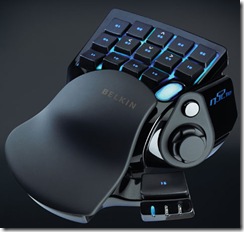
My n52te Layout

n52te-1web

I’d been putting off writing a post about my n52te layout for a while now; then someone had to go and ask about it. :) Ready for an in-depth look at the peripheral I can’t game without? Here goes. (Besides, how often do I get to put something in both the ‘IRL’ and the ‘Guides’ categories?)


Philosophy

  • I wanted to be able to have my large amount of skills in easy reach. The most common skills should be right under my fingers, and the less common skills shouldn’t require much reaching.
  • I wanted my skill rotation to be matched by my button layout as often as possible.
  • I wanted my on-screen layout to match my real-world layout. The built-in WoW action bar does a good job of mimicking a row of keys, but for the unique layout of the n52te (two rows of five keys, one row of four keys, a clickable scroll wheel, a joystick/directional pad, and an extra button), I had to use something else – namely, Dominos.

Diagram and Keybinds

Here’s a rough sketch of the n52′s key layout, along with what keys are bound to what. Click to see it at full-size.

n52diagram

Not pictured here is the directional pad (which would actually be somewhere between the ‘alt’ thumb button and the wide flat ‘pet attack’ button. Due to the odd layout of the directional pad on the n52 (if you look at the picture at the very top of this post, you’ll notice it’s situated sideways) I have it keyed to Joystick Up, Down, Left, and Right – but turned 90 degrees.

That is, Right on the d-pad is keybound to Joystick Up, Down on the d-pad is keybound to Joystick Right, Left on the d-pad is bound to Joystick Down, and Up on the d-pad is keybound to Joystick Left.) Hence, I press what on the physical hardware looks like Right, but in-game it moves me forward – this just feels more natural.

Confused? Good, I confused myself writing that.

Here’s a screenshot of my actual layout in-game, using Dominos (only half the keys are shown at this time):

n52_ingame

This is actually accomplished by having two overlapping bars – one with 12 keys arranged into 3 rows of 5 keys each; one with two keys arranged into … one row of two keys. (The slight off-position might give it away, but [ and ] are on their own bar.) I also use the paging feature of Dominos so that when I hold down alt, each bar shows a different bar instead. 1 through 10, -, and = are on bar 1 always though – that way when I get in a vehicle or change forms (on a shapeshifting class, or when my DK turns into a ghoul after death), I can still access my keys.

The class bar is just above the buttons, the vehicle bar (invisible in this shot) is just to the right of the class bar, and the pet bar is at about half-scale and just above the class bar.

Death Knight-Specific DPS Key Layout

Key

Without Alt Pressed

With Alt Pressed

1

Death and Decay

Chains of Ice

2

Pestilence

Blood Boil

3

Death Grip

Dark Command

4

Mind Freeze

Strangulate

5

Death Coil

Rune Strike

6

Plague Strike Macro

Empower Rune Weapon

7

Icy Touch Macro

Corpse Explosion

8

Blood Strike Macro

Blood Tap

9

Scourge Strike Macro

Death Strike Macro

0

Unholy Blight

Summon Gargoyle Macro

-

Bone Armor

Horn of Winter

=

Anti-Magic Shell

Berserking

[

Icebound Fortitude

Death Pact

]

Raise Dead

Army of the Dead


When using this layout, my fingers tend to rest with my pinky on -, ring somewhere between 6 and 7, middle on 8, index of 9, and thumb on the d-pad. If I need to press something that requires alt to be held down but I still need to move, then I resort to mouse moving. Things on the ‘back’ (as I think of the alt-button keys) tend to be largely instant cast, cooldowns, and things I really don’t need to cast while moving, however.

My buffs are easy to reapply with my pinky finger, while my main rotation (PS IT BS BS SS -> PS IT SS SS) is easy enough to hit with my main fingers on the ‘home’ row. My two most commonly-used runic power abilities, Unholy Blight and Death Coil, are easily at hand, while Summon Gargoyle and Rune Strike are also easy to use (I rarely ever see a Rune Strike outside of soloing, however – if I were tanking, I’d work it into my macros instead of giving it its own key).

Bonus Tip: Fake Strafing

You may have noticed my layout doesn’t allow for remapping the E and Q keys on the keyboard – strafing. I was worried about this at first, but then I realized after a week or so how very little I ever strafed. And, when I needed to do so, it’s easy enough to fake strafing.

  • To “fake strafe” left: move left with the d-pad, hold down the right mouse button and move the mouse right.
  • To “fake strafe” right: move right with the d-pad, hold down the right mouse button and move the mouse left.

This may take a little bit to get used to (less so if you’re already used to mouse turning, moreso if you’re a keyboard turner), but in the end it sort of feels like conducting a very tiny orchestra of one, and instead of music, there’s running. … Okay, so maybe it’s nothing like an orchestra at all.

Macro Usage

You may have also noticed that almost everywhere that there was a strike in the table above, I used a macro. Plain and simple: I hate remembering to activate trinkets. I also hate manually ordering my pet to attack. Hence, my Plague Strike, Icy Touch, Blood Strike, Scourge Strike, and Death Strike macros all follow this pattern:

Name: Death Strike
Icon: Question Mark
Body:

#showtooltip Death Strike
/console Sound_EnableSFX 0
/script UIErrorsFrame:Hide()
/use 13
/use 14
/petattack
/script UIErrorsFrame:Clear(); UIErrorsFrame:Show()
/console Sound_EnableSFX 1
/cast Death Strike

Essentially this activates my trinkets, sends my ghoul on the attack, and then uses the skill in question. By disabling the sound effects and hiding/clearing/showing the error frame, I also don’t get any errors if my trinkets are on cooldown. I can also put abilities in there that don’t activate the general cooldown, if I wish: Rune Strike, or Berserking. (I probably will put Berserking in there so I can free up a key for Raise Ally, to be honest.) And attempting to /use a trinket with no on-use effect just skips it, so no worries on that front either.

About the Author

Stop used to be a warlock, then he was a death knight; first he was Horde, then he was Alliance again, and now he's Horde again. For good this time. Lok'tar ogar!